![TrustMate_logo_white-2.svg]](https://knowledge.trustmate.io/hubfs/TrustMate_logo_white-2.svg)
What’s covered in this article?
- How to purchase a plan step by step?
- How to pay for TrustMate services?
- Does the subscription renew automatically?
- Can I pay upfront for the whole year?
- Is manual payment (outside the system) possible?
- Where can I find invoices for paid services?
- Can I receive a pro forma invoice?
- Can I change my invoice details?
- Where can I find my payment history?
- How can I change my pricing plan?
- How to cancel a subscription?
- Will I get a refund after cancellation?
- What to do if my card is declined?
- Why hasn't my payment been processed?
- How to update a payment card?
- Are my payment details secure?
- What payment methods are supported?
- Which currencies are accepted?
- Do you issue invoices for international clients?
- Can I test TrustMate for free?
- Are there any discounts or promotions available?
- Are there any hidden fees?
- How much does the Enterprise package cost?
- Can I receive a corrected invoice?
- Can I use TrustMate if I don’t own a business?
How to purchase a plan step by step?
- Log in to your TrustMate account.
- Click on the profile icon in the top right corner.
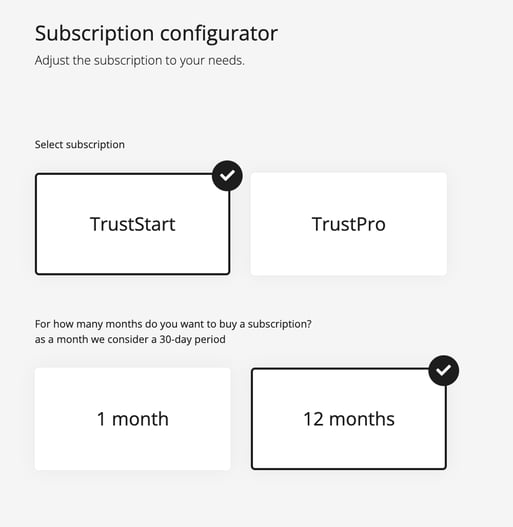
- Go to Payments → Choose a plan.
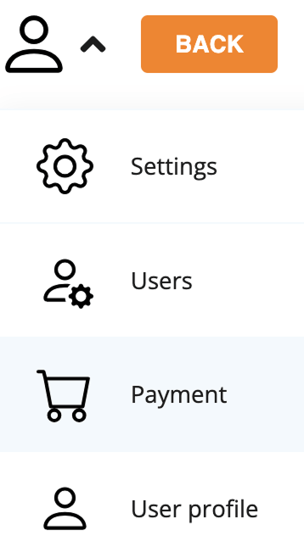
- Select the plan you're interested in and proceed to payment.
How to pay for TrustMate services?
TrustMate offers several convenient payment methods that allow you to pay for the service quickly and hassle-free. For one-time payments, you can choose from popular and secure options such as BLIK, credit/debit card, online transfer via Przelewy24, or Klarna, which enables deferred payments.
If you opt for a subscription (recurring payment), payment is available exclusively by card. Funds are automatically charged every 30 or 360 days, depending on the subscription duration.
Does the subscription renew automatically?
Yes, if you're subscribed, TrustMate will automatically charge your saved card every 30 or 360 days, depending on your plan. There’s no need to worry about monthly transfers-everything happens automatically.
Can I pay upfront for the whole year?
Yes, TrustMate allows annual payments in advance. This option is ideal for companies looking to streamline accounting processes. You can choose an annual plan directly in the dashboard and complete payment with a single click.
Is manual payment (outside the system) possible?
In certain cases, manual payments via traditional bank transfer are possible. TrustMate can issue an invoice with a 7-day payment term. To arrange this, email: support@trustmate.io, including your selected plan and preferred payment method.
Where can I find invoices for paid services?
All billing documents are available in your client panel.
To download an invoice:
- Log in to your account.
- Click on the profile icon in the top right corner.
- Go to Payments → Payment history.
Can I receive a pro forma invoice?
No, TrustMate does not issue pro forma invoices. However, if you opt for a manual bank transfer, we can provide a standard invoice with a payment deadline.
Can I change my invoice details?
Yes. To update company name, address, or VAT ID, contact our support team before the next invoice is issued. Email: support@trustmate.io.
Where can I find my payment history?
You can access your full payment history in the user dashboard.
Click the profile icon → Payments → Payment history.
You’ll find dates, amounts, transaction descriptions, and download links for invoices.

How can I change my subscription plan?
If you're using TrustStart or TrustPro, you can change your plan directly in the panel via Payments → Choose a plan.
For Enterprise plans, which include advanced features and a tailored approach, please contact TrustMate’s team. An advisor will prepare a personalized offer for you.

How to cancel a subscription?
To cancel auto-renewal:
- Log in to your account.
- Go to Payments → Recurring payments.
- Click Cancel.
Your service will remain active until the end of the paid billing cycle but will not renew automatically.
Will I get a refund after cancellation?
No. TrustMate does not issue refunds for unused time after cancellation. You retain access to the service until the end of your current billing period.
What to do if my card is declined?
If your card is declined, check the error message and then contact support at support@trustmate.io. Include details of the error to help us quickly identify and resolve the issue.
Why hasn’t my payment been processed?
If you've made a payment but it’s not showing in the system, contact us at support@trustmate.io. We’ll verify the transaction and assist accordingly.
How to update a payment card?
To update your payment card, contact our support team at support@trustmate.io. We’ll guide you through the process step by step.
Are my payment details secure?
Yes. TrustMate uses Stripe, one of the world’s most secure payment providers. Stripe is PCI DSS certified, ensuring your payment data is fully protected.
What payment methods are supported?
TrustMate supports:
- BLIK
- Credit/debit cards (Visa, MasterCard)
- Online transfers via Przelewy24
- Klarna
All payments are processed securely through Stripe.
Which currencies are accepted?
Payments can be made in:
- PLN (Polish Zloty)
- EUR (Euro)
- USD (US Dollar)
- RON (Romanian Leu)
The system automatically detects your company’s location and sets the appropriate currency.
Do you issue invoices for international clients?
Yes, TrustMate issues invoices for companies abroad. Simply provide your business details and foreign VAT number (if applicable) in the dashboard, and the invoice will comply with legal requirements.
Can I test TrustMate for free?
Yes! Every company can enjoy a 90-day free trial. During the trial, you can:
- Integrate TrustMate with your store
- Start collecting customer reviews
- Use widgets
- Access full functionality of the TrustStart package
At the end of the trial, you can choose to continue by subscribing to one of our plans.
Are there any discounts or promotions available?
Yes, discounts may be available in certain cases. Simply email support@trustmate.io and describe your situation. Our team will check if an individual offer is possible.
Are there any hidden fees?
No. TrustMate’s pricing is fully transparent and publicly available at trustmate.io/pricing. There are no hidden charges-everything is clearly outlined in each package.
How much does the Enterprise plan cost?
Enterprise pricing is custom and depends on factors such as:
- Store size
- Monthly order volume
- Required features
To get a quote, email support@trustmate.io with:
- Your store’s domain
- Average monthly order volume
- Features you’re interested in
Can I receive a corrected invoice?
Yes, in most cases invoice corrections are no problem. Just email support@trustmate.io with the invoice number and a short description of the issue.
Can I use TrustMate if I don’t own a business?
Unfortunately, no. TrustMate is designed for businesses and entrepreneurs only. You must provide a valid VAT ID (NIP) and company billing details.